The 10 Best Rack Mountable Digital Mixers
Updated by · How we research

Ten rack and stage-box digital mixers compared on preamps, recording and tablet control. The Behringer X Air XR18 leads for value and a huge user base. When users buy our independently chosen editorial picks, we may earn commissions to help fund the Wiki.
A rack-mount digital mixer has few or no faders: the preamps, effects and recorder live in a metal box, and you mix from a tablet, phone or laptop. That makes the wireless link the weak spot, and many owners add a separate router. This page covers digital units for bands, churches and small venues, not analog or DJ rack mixers.


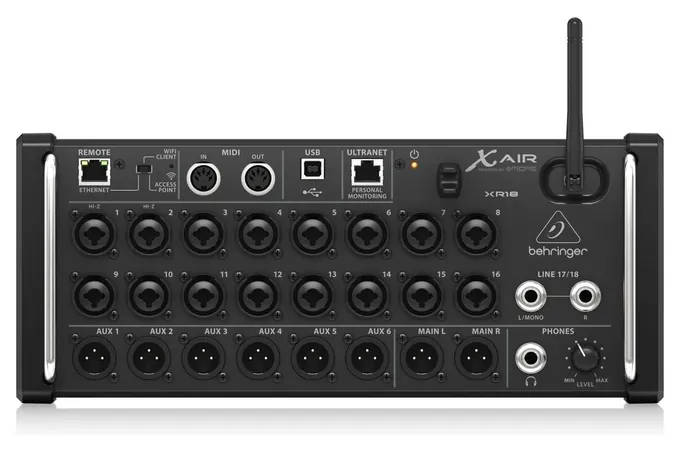
From the manual
- Access-point mode serves four devices at most, on 2.4 GHz channels 1 to 11, and starts with no Wi-Fi security until you set a key. p. 15
- Hold the recessed reset button two seconds to restore network settings; ten seconds wipes the whole mixer back to factory defaults. p. 5
- Inputs 1 and 2 have high-impedance preamps, so a guitar or bass plugs straight in without a direct box. p. 5
- The tablet app covers iPad and Android; Mac, Windows and Linux computers run the X Air Edit program. p. 15
Why the Behringer X Air XR18 is our top pick
Our pick has the same 16 Midas-designed preamps as our runner-up, the Behringer X32 Rack, in a box half the weight with a Wi-Fi access point inside, so a band can mix from a tablet without buying a router.1,3,2,4 Up to four tablets, phones or computers connect straight to it.2 The runner-up has no radio: tablets reach it through its Ethernet port, so a router comes to every gig.4
The XR18 records all 18 of its inputs to a computer over USB, one track each, and its maker lists the same 0.8-millisecond delay from input to output as the runner-up.1,3 Its radio has one limit worth knowing: it works only on the 2.4 GHz band.2 Mike Crofts, who reviewed it for Sound On Sound and bought one for his own live shows, said an external 5 GHz router is probably to be recommended and noted that the mixer keeps running its current mix if the tablet disconnects.5
The X32 Rack is the better buy when a guest engineer must work the unit itself, or when the band will outgrow 16 microphones: it has a 5-inch color screen with knobs, two stage-box ports carrying 48 channels each, and 32-track USB recording.3,4 For a band that mixes from its own tablet, our pick does the same job in a smaller, lighter box.
| Behringer X Air XR18 | Behringer X32 Rack | |
|---|---|---|
| Built-in Wi-Fi | Yes, up to 4 devices | No, needs a router |
| Controls on the unit | None, app only | 5 in screen and knobs |
| USB recording | 18 in / 18 out | 32 in / 32 out |
| Stage-box ports | None | Two AES50, 48 channels each |
| Weight | 3.2 kg | 6.5 kg |
Sources
- Behringer X Air XR18 1Product page and specs 2X Air user manual (PDF), pp. 15, 33
- Behringer X32 Rack 3Product page and specs 4User manual (PDF), pp. 5, 24, 59
- 5Sound On Sound: Mike Crofts's XR18 review, November 2015
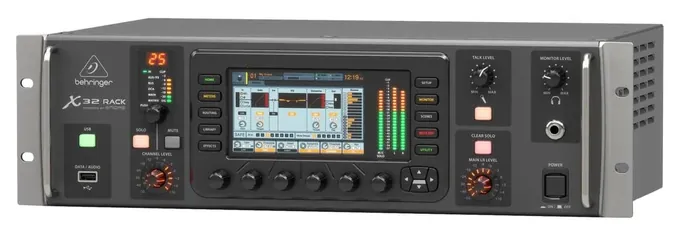
From the manual
- Turn on Safe Main Levels in the setup screen: it keeps the main mix down at boot and when a scene loads. p. 19
- Use Safe Shutdown before cutting power, since saving many recent changes to memory can take up to a minute. p. 19
- Firmware loads from a USB stick: hold the USB button while switching on, and the boot runs two to three minutes longer. p. 19
- Stage boxes on the AES50 ports need shielded Cat-5e cable with Ethercon ends, no longer than 100 meters. p. 5
Compare the specs
Swipe the table sideways to see every column.
| Product | Mic preamps (count) | Built-in Wi-Fi | USB audio to a computer (channels in / out) | Controls on the unit | Rack space (U) |
|---|---|---|---|---|---|
| 1. Behringer X Air XR18 | 16 | Yes, up to 4 devices | 18 / 18 | None, app only | — |
| 2. Behringer X32 Rack | 16 | No, router via Ethernet | 32 / 32 | 5 in screen and knobs | 3U |
| 3. Soundcraft Ui24R | 20 | Yes, dual band, 10 devices | 32 / 32 | None; HDMI monitor output | 4U |
| 4. Behringer WING Rack | 24 | No, add a router | 48 / 48 | 10.1 in touchscreen, knobs | — |
| 5. Mackie DL16SE | 16 | No, router via Ethernet | 16 / 16 | None, app only | 3U |
| 6. Behringer X Air XR16 | 8 | Yes, up to 4 devices | Stereo to USB stick only | None, app only | — |
| 7. Allen & Heath CQ-18T | 16 | Yes, dual band | 24 / 22 | 7 in touchscreen, knobs | Desktop; ear kit extra |
| 8. Yamaha TF-Rack | 16 | No, Ethernet port only | 34 / 34 | Touchscreen and knobs | 3U |
| 9. PreSonus StudioLive SE 32R | 32 | No, needs a router | 64 / 64 | None, app only | 2U |
| 10. Allen & Heath SQ-Rack | 16 | No, needs a router | 32 / 32 | 7 in touchscreen, knobs | 4U |
Rack spaces for the X32 Rack, TF-Rack and SE 32R are worked out from the makers' listed heights, at 1.75 inches a space. Behringer gives no rack height for the XR18, XR16 or WING Rack.
Sources
- Behringer X Air XR18 and XR16 XR18 product page XR16 product page
- Behringer X32 Rack Product page User manual (PDF)
- Soundcraft Ui24R Product page User guide v1.0 (PDF)
- Behringer WING Rack Product page
- Mackie DL16SE Owner's manual (PDF) Spec sheet (PDF)
- Allen & Heath CQ-18T Product page
- Yamaha TF-Rack Product page Quick guide (PDF)
- PreSonus StudioLive SE 32R Product page Owner's manual (PDF)
- Allen & Heath SQ-Rack Product page Reference guide V1.6.0 (PDF)
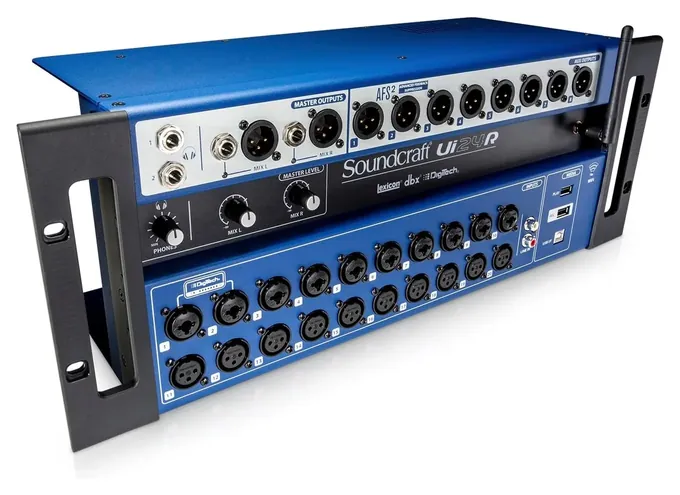
From the manual
- Up to 10 tablets, phones or computers can control it at once, each through a web browser. p. 4
- Set a new hotspot password on the first connection; the factory password is printed in the guide. p. 17
- The warranty runs twelve months from delivery and holds only if it's installed per the manual and repaired only by Soundcraft or its dealer. p. 8
- Soundcraft's help desk says overheating can drop its connection; leave at least three inches at the sides and keep it out of the sun. Soundcraft help page
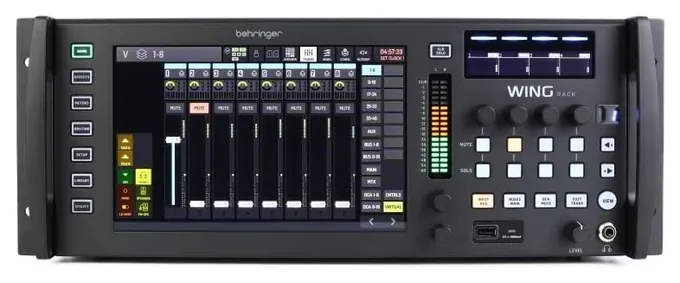
From the manual
- The installed recording card writes 32 tracks to one SD card or 64 to two linked cards; the front USB port records four. p. 83
- SD cards must be FAT32 with a 32 kB cluster size; the console can format cards up to 32 GB itself. p. 83
- Its AES50 ports work with Behringer X32 consoles and S-series stage boxes and Midas M32 and DL-series units. p. 11
- Download the firmware file made for the WING Rack, not the other WING models; it loads from a FAT32 USB stick. p. 88
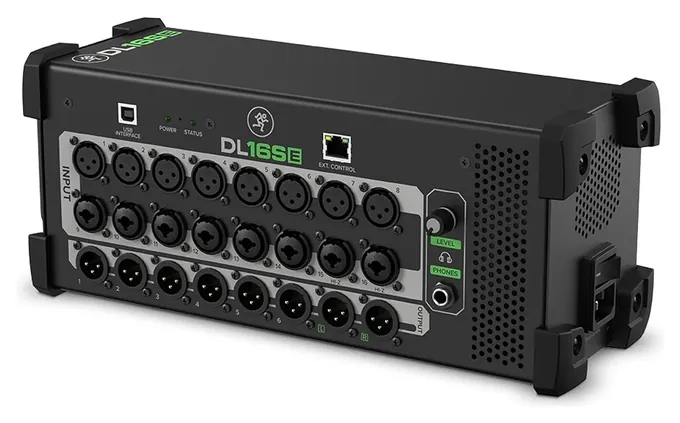
From the manual
- Wireless control needs your own router; plug the mixer into one of its LAN ports, not the WAN port. p. 9
- Macs need no USB driver for recording, but Windows computers need Mackie's driver from its website. p. 8
- Save the show to a tablet or computer before forcing a firmware update, or it can be lost. p. 8
- The rack ears ship in the packing foam, and a Phillips screwdriver is the only tool needed to fit them. p. 21
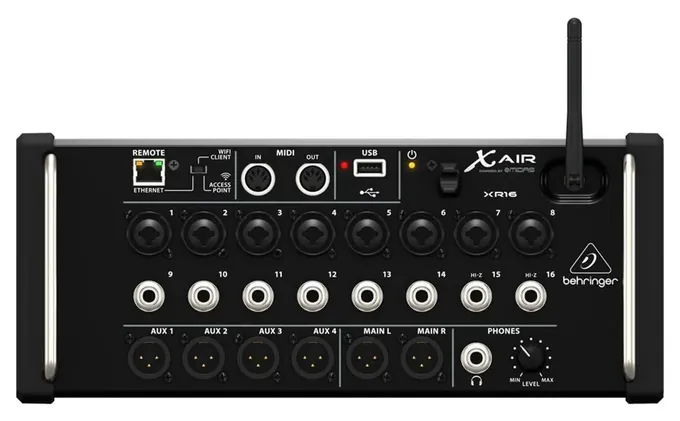
From the manual
- Recording is two-track stereo to a flash drive; the multitrack USB interface belongs to the XR18 and X18 only. p. 4
- Channels 15 and 16 accept a guitar or bass directly. p. 6
- Don't pull the flash drive while the red LED beside the USB port is lit. p. 6
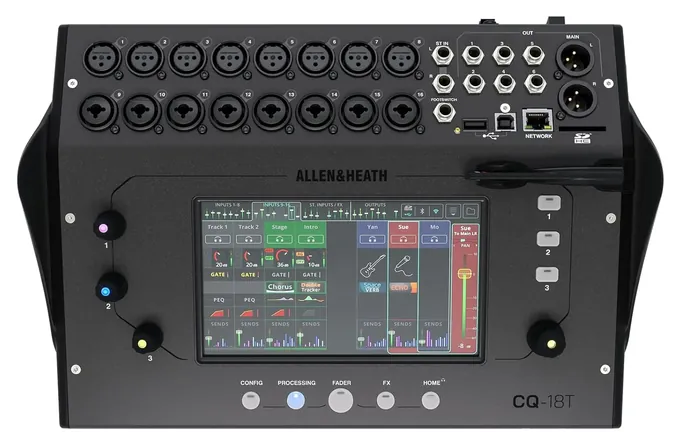
From the manual
- Only two copies of the CQ-MixPad control app can connect at once, plus up to six CQ4You monitor apps. Connecting control apps
- Bluetooth carries music into the mixer only; it can't be used for remote control. Connecting control apps
- The mixer's firmware and every app need the same first two release digits, or they won't connect. Connecting control apps
- If you stream over Bluetooth, Allen & Heath suggests putting the Wi-Fi on 5 GHz to avoid interference. Connecting control apps
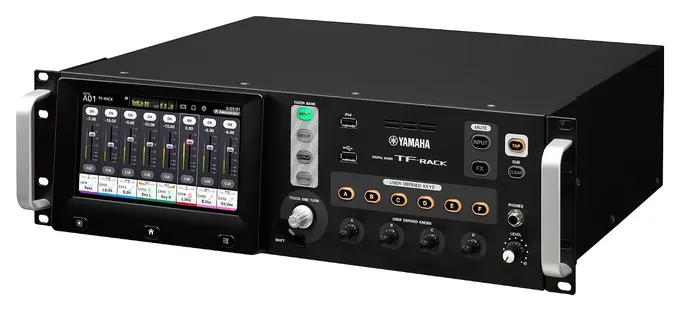
From the manual
- Wait at least 10 seconds after the last change before switching off, and six seconds before switching back on. p. 10
- To record to a USB drive, Yamaha says use a hard disk or other fast drive; ordinary memory sticks aren't guaranteed. p. 13
- Macs need no driver for its USB audio, but Windows needs the Yamaha Steinberg USB driver. p. 9
- Extra inputs come through an NY card, such as the NY64-D Dante card, in the rear slot. p. 9
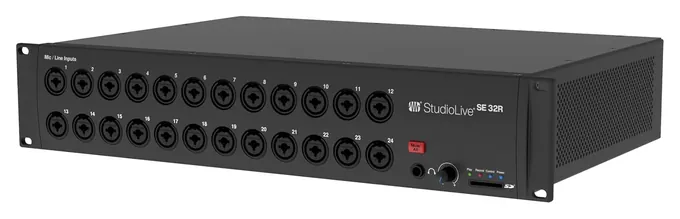
From the manual
- No router comes in the box, and tablet or wireless control needs one; PreSonus lists recommended models on its site. p. 3
- Firmware updates need a computer with internet access or an SD card of at least 2 GB. p. 3
- It can also serve as a stage box for StudioLive Series III consoles, covered in a separate addendum. p. 3
- The three-year warranty transfers to a second owner only if the sale is endorsed on the original receipt. warranty sheet, p. 1
PreSonus StudioLive Series III rack mixers owner's manual (PDF)
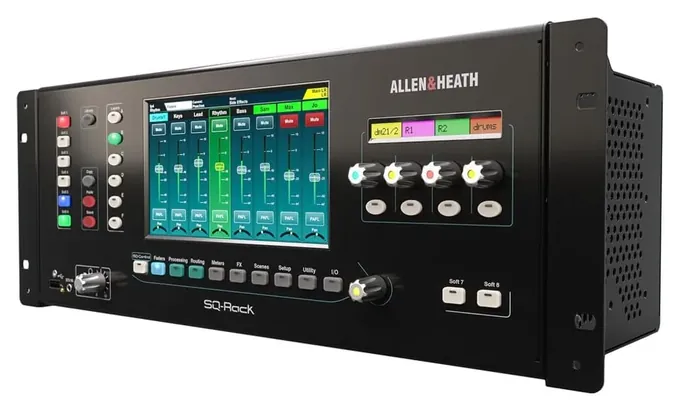
From the manual
- Keep the sides and air vents clear while it runs; the cooling fans need the airflow. p. 6
- A USB drive on the unit records up to 32 tracks at 48 kHz, or 16 at 96 kHz. p. 110
- The SLink stage-box port runs one protocol per connection; mixing protocols on one cable isn't supported. p. 22
- The network port carries control only, so tablet mixing needs a router or access point. p. 22
Editor's Notes
November 4, 2026, by Ezvid Wiki Editors:
We read the makers' manuals for all ten mixers and added a spec table, a section on why the XR18 leads, and setup notes from each manual. We corrected the rack-space advice, since the StudioLive SE 32R needs only two spaces and the CQ-18T is a desktop mixer, and the DL16SE chip that called it half-width. Drawbacks we couldn't source, such as the WING Rack's learning curve and the CQ-18T's screen in sunlight, gave way to ones the makers document.
October 23, 2026, by Ezvid Wiki Editors:
The Behringer X Air XR18 now leads this list. It packs 16 preamps, multitrack recording and free tablet apps into a small box, and few mixers have a bigger base of owners sharing tips. The old list had drifted toward tabletop consoles, so the Allen & Heath QU-16, Zoom LiveTrak L-20, QSC TouchMix-16 and the PreSonus desk listed as Studiolive Performance USB are gone. The Mackie DL32R and the Allen & Heath AH-QU-PAC-32 are discontinued, and the old StudioLive 32R gave way to the PreSonus StudioLive Series III SE 32R.
The Behringer X32 Rack and Soundcraft Ui24R stay. New picks include the Behringer WING Rack, the Mackie DL16SE and the Allen & Heath SQ-Rack. We leaned on long-form reviews in Sound On Sound, Bonedo and AudioTechnology, makers' spec sheets, and owner threads, which kept pointing at one problem: weak onboard Wi-Fi.
Earlier notes
December 21, 2020, by Luke Mitchell:
While many of the tried and trusted mixers in this ranking have been around a while, they remain in popular demand and continue to garner praise in contemporary review pages and forums, hence they retain their places on this list. Our latest update does have some replacements, however, that reflect the growing trends in wireless connectivity and control via smart devices.
These include the Mackie DL32R and the Soundcraft Ui24 - two similar units offering 32 and 24 channels, respectively, each being remotely controllable, and each doubling as an audio interface for direct connection to a DAW. This essentially makes the unit a conduit for physical cables, with the actual mixing work carried out on the Mac, PC, or mobile device, saving space and adding considerable versatility over their hardware counterparts.
February 7, 2019, by Daniel Imperiale:
It seems the big decision consumers have in this category is between models with full physical controls and those who cede their knobs and faders to tablets and PCs. Allen & Heath have one selection of each type, but their fully physical model takes priority for its reliability even if the user forgets to charge their iPad. [2026 update: Both Allen & Heath picks on today's list, the CQ-18T and SQ-Rack, have a touchscreen on the unit, and the list now leads with the tablet-controlled XR18, which keeps playing its current mix if the tablet drops off.]
Special Honors
Mackie DL32SE Readers looking for the Mackie DL32R should know it is discontinued. Mackie's current 32-channel rack stage box is the DL32SE, which shares a spec sheet and the Master Fader SE app with the DL16SE and is sold through music retailers. mackie.com
Stage Box, Screen Or Core
Desk mixers with faders that can be bolted into a rack with a kit, such as the Allen & Heath Qu-16, are a fourth option, but they are consoles first.
Rack digital mixers come in three kinds. A stage box, like the Behringer X Air XR18, has the mic preamps, processing and Wi-Fi in one small box and no real controls on the front. You mix entirely from a tablet, phone or laptop. They are cheap for what they do, but if the control device fails, you can't change anything until it reconnects. The mix itself keeps playing.
The second kind adds a screen and knobs on the front panel. The Behringer X32 Rack, Yamaha TF-Rack, Behringer WING Rack and Allen & Heath SQ-Rack all work this way, so a guest engineer can walk up and run the show without anyone's phone. They cost more and take more rack space. Reviewing the TF-Rack for ProSoundWeb in June 2017, M. Erik Matlock, a former church media director, found every parameter within reach on its front panel without the app.
The third kind is a core: a processing box with no preamps at all, such as the X32 Core or Midas M32C. It needs separate digital stage boxes for microphones, so it suits installers more than bands. Desk mixers with faders that can be bolted into a rack with a kit, such as the Allen & Heath Qu-16, are a fourth option, but they are consoles first.
Plan The Network Before The Gig
Wi-Fi is the most common complaint about these mixers. Built-in radios are small, and a room full of phones can crowd them out. Sound On Sound reviewer Mike Crofts, who bought an XR18 for his own live work, wrote in November 2015 that some venues challenge any built-in Wi-Fi and that an external 5 GHz router is "probably to be recommended." Soundcraft's help desk says the Ui24R's hotspot "is not a very powerful Wi-Fi radio" and suggests switching the Wi-Fi channel or adding an external router. A router with a 5 GHz band, placed above the crowd, fixes most dropouts. A cable to a laptop is the safest backup.
Some mixers have no Wi-Fi inside at all. The PreSonus StudioLive SE rack models need a router or a wired computer, as Mix noted in its review of the SE line, and the Mackie DL16SE connects through a router over Ethernet. Set passwords, too: Sound On Sound found the XR18's wired network port had none, and its built-in access point starts with no Wi-Fi security until you set a key.
Count how many devices you need. The Soundcraft Ui24R accepts up to 10 at once in a web browser, and Mackie's app allows up to 20, which matters when every musician wants to set a personal monitor mix.
Count Preamps, Not Channels
A box sold as a 40-channel mixer may have only 16 microphone inputs. The rest are line inputs, USB returns and effects returns. Count the mic preamps you will really use, add a few spares, and pick from there: 8 suits a duo or a podcast, 16 covers most bands, and a full drum kit with a choir can need 32.
Recording is another split. Most picks send every channel to a computer over USB for multitrack recording and virtual soundcheck. The Ui24R records straight to a USB stick, while the XR16 records only a stereo mix. The Mackie DL16SE spec sheet lists 16 x 16 USB audio, and the Behringer WING Rack goes much further.
Finally, check the rack itself. Most of these mixers take three or four rack spaces, but the StudioLive SE 32R needs only two, and the CQ-18T sits on a desk unless you add its optional rack-ear kit. Measure the depth of your case, and leave room for cables and airflow behind the unit. Phantom power should be switched on per channel, since it can harm some ribbon microphones.
How we researched this
We compared 22 rack and stage-box digital mixers and read a maker's manual for each of the 10 picks: Behringer's X Air, X32 Rack and WING manuals, Soundcraft's Ui24R user guide, Mackie's DL16SE owner's manual and spec sheet, Allen & Heath's CQ user guide and SQ reference guide, Yamaha's TF-Rack quick guide and PreSonus's StudioLive Series III rack manual. Reviews in Sound On Sound, ProSoundWeb, Bonedo and Mix, plus Soundcraft's troubleshooting page, shaped the buyer's guide; Sound On Sound and Soundcraft drive the Wi-Fi and router advice. A November 2026 search of CPSC recall notices found one related recall, Yamaha's 2024 recall of PA-10B power adapters sold with its analog MG mixers, and none for any of these 10 mixers or the other five brands.
Sources (10)
- Sound On Sound: Behringer X Air XR18 review
- Sound On Sound: Behringer X32 Core and Rack review
- Sound On Sound: Soundcraft Ui24R review
- Bonedo: Behringer WING Rack review
- Mackie: DL16SE and DL32SE spec sheet
- AudioTechnology: Allen & Heath CQ-18T review
- ProSoundWeb: Yamaha TF-Rack review
- Mix: PreSonus StudioLive SE series review
- CPSC: SaferProducts.gov recall search
- Soundcraft: Troubleshooting connections to the Ui24R
Frequently asked questions
Can I mix without a tablet?
Yes, on models with a screen and knobs on the front, such as the Behringer X32 Rack, Behringer WING Rack, Yamaha TF-Rack, Allen & Heath SQ-Rack and CQ-18T. The Soundcraft Ui24R can also run from a monitor, mouse and keyboard plugged into its side ports. Stage boxes like the XR18 need a tablet, phone or computer for every change.
Do I need a separate Wi-Fi router?
For most gigs, yes. Built-in Wi-Fi works in a quiet room but can drop out in a crowd. A dual-band router, or a cable to a laptop, is the reliable setup, and some models have no Wi-Fi inside at all.
What happens if the tablet disconnects mid-show?
The mixer keeps passing sound with its last settings. You just can't change anything until a device reconnects, which is why a second phone or a laptop on a cable is a good backup.
Can these mixers record a live show?
Most picks record every channel to a computer over USB. The Soundcraft Ui24R records multitrack straight to a USB stick, and the Behringer X Air XR16 records a stereo mix only.
What replaced the Mackie DL32R?
Mackie discontinued the DL32R. Its current rack stage boxes are the DL16SE and DL32SE, controlled with the Master Fader SE app.