The 8 Best Home Printers
Updated by · How we research

A cheap printer can cost more in ink. Eight ink tank, inkjet and laser models compared on cost per page, speed and scanning. Epson EcoTank ET-2903 leads. When users buy our independently chosen editorial picks, we may earn commissions to help fund the Wiki.
A cheap printer is often the expensive one: Consumer Reports figures some budget inkjets cost more in ink over two years than an ink tank costs outright. Families printing homework, forms, shipping labels and the occasional photo feel that most. Homes that print mostly text can skip color entirely with a black-and-white laser.


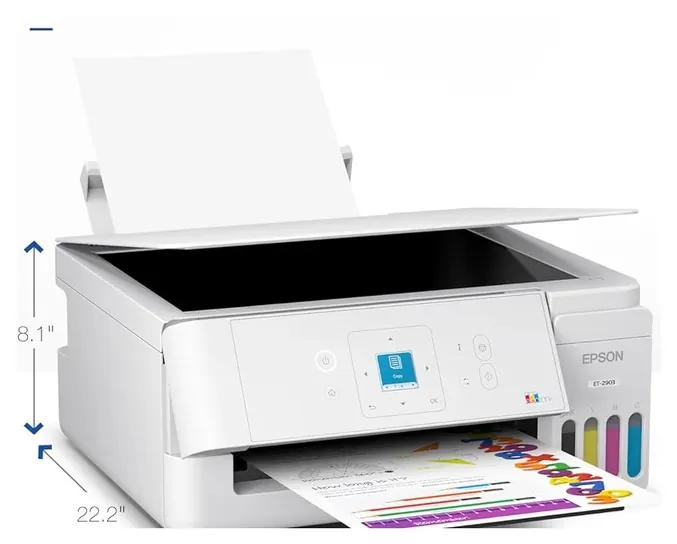
From the manual
- The bottles in the box are rated for about 3,600 black and 6,500 color pages; part of that ink primes the printer at setup. pp. 1-2
- It connects by USB or 2.4 GHz Wi-Fi only: no Ethernet port and no 5 GHz band. p. 2; User's Guide, Wi-Fi specs
- The warranty runs one year or 50,000 printed sheets, whichever comes first, and a two-sided print counts as two sheets. warranty, p. 1
- Epson's warranty excludes damage caused by parts or supplies it doesn't distribute, so third-party ink is at your own risk. warranty, p. 2
Why the Epson EcoTank ET-2903 is our top pick
Ink is what a home printer costs over the years, and the ET-2903's bottled ink costs a fraction of what cartridges do per page. The bottles in the box are rated for about 3,600 black and 6,500 color pages, which its maker puts at up to three years for a home printing about 100 pages a month.1 One replacement black bottle is rated for 4,700 pages; at the $18 a bottle Consumer Reports listed, that is under half a cent a page.1,6
Our runner-up, the Brother MFC-J4355DW, is cheap to run for a cartridge printer, but not that cheap: Consumer Reports measured 4 cents per text page and 16.4 cents per color graphics page,5 and its biggest black cartridge is rated for about 5,000 pages.3 Its starter cartridges are rated for about 1,800 black and 750 color pages,4 and even with its biggest cartridges Wirecutter works out about 1.5 cents per black page.7
The runner-up is the better office machine. It prints black pages about twice as fast, has a 20-page feeder, automatic two-sided printing, fax and dual-band Wi-Fi, and carries a two-year warranty against our pick's one year or 50,000 sheets.1,2,3,4 If you copy or scan stacks of paperwork every week, buy the runner-up. For homework, forms and color pages at the lowest ink cost, the ET-2903 comes first.
| Epson EcoTank ET-2903 | Brother MFC-J4355DW | |
|---|---|---|
| Ink in the box | About 3,600 black / 6,500 color pages | About 1,800 black / 750 color pages |
| Black ink per page | Under half a cent | 4 cents measured; 1.5 with XXL cartridges |
| Black speed | 11 pages/min | 20 pages/min |
| Feeder, auto 2-sided, fax | None, no, no | 20 pages, yes, yes |
| Warranty | 1 year or 50,000 sheets | 2 years |
Sources
- Epson EcoTank ET-2903 1Specification sheet (PDF), pp. 1–2, 2 2Limited warranty (PDF), p. 1
- Brother MFC-J4355DW 3Online User's Guide (PDF), pp. 576–579, 583 4Product page (ink bundle)
- Consumer Reports 5Brother MFC-J4355DW lab results 6Epson EcoTank ET-2903 lab results
- 7Wirecutter: The best all-in-one printer
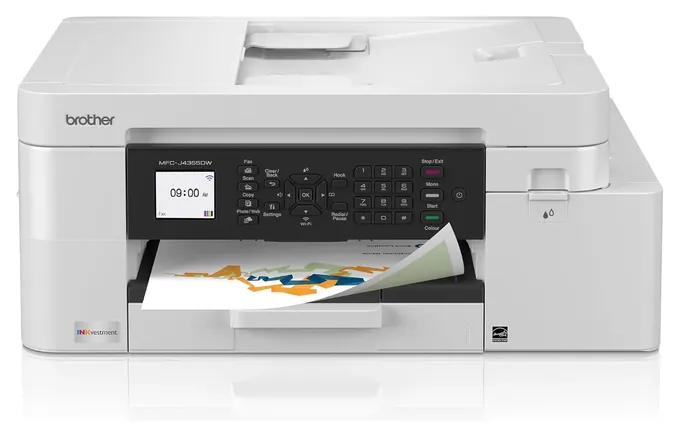
From the manual
- The USB port sits inside, under the scanner cover, with a channel to route the cable out the back; this model has no Ethernet port. pp. 36, 579
- Even when switched off, it wakes now and then to service the print head, then turns itself off again. p. 576
- The feeder takes up to 20 pages, but originals longer than 11.7 inches must go through it one page at a time. p. 576
- Brother provides no Mac driver: Macs print, scan and send PC faxes through AirPrint. p. 581
Compare the specs
Swipe the table sideways to see every column.
| Product | Ink | Also does | Black speed (pages/min) | Document feeder (sheets) | Auto 2-sided | Paper tray (sheets) |
|---|---|---|---|---|---|---|
| 1. Epson EcoTank ET-2903 | Refill bottles | Copy, scan | 11 | None | No | 100 |
| 2. Brother MFC-J4355DW | Cartridges | Copy, scan, fax | 20 | 20 | Yes | 150 |
| 3. Brother HL-L2460DW | Black toner | Prints only | 36 | None | Yes | 250 |
| 4. HP OfficeJet Pro 9125 | Cartridges | Copy, scan, fax | 22 | 35 | Yes | 250 |
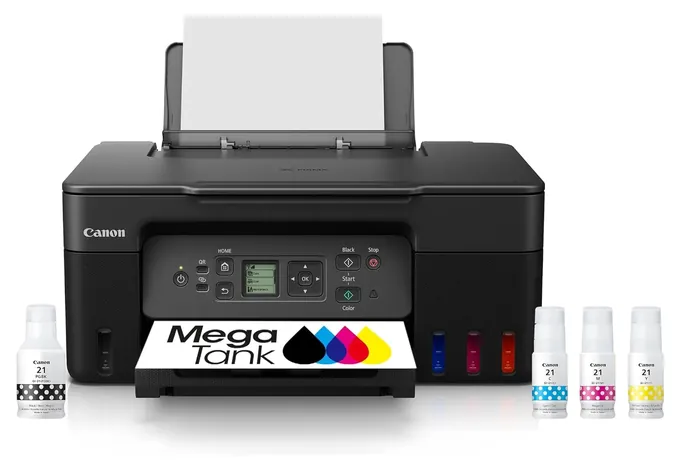
| 5. Canon PIXMA G3270 | Refill bottles | Copy, scan | 11 | None | No | 100 |
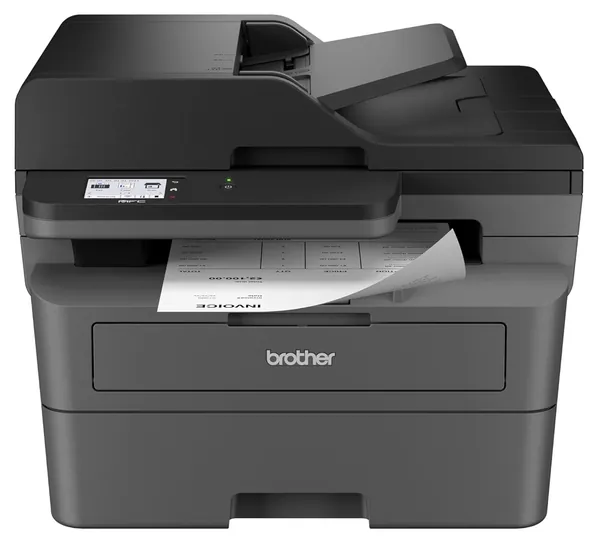
| 6. Brother MFC-L2820DW | Black toner | Copy, scan, fax | 34 | 50 | Yes | 250 |
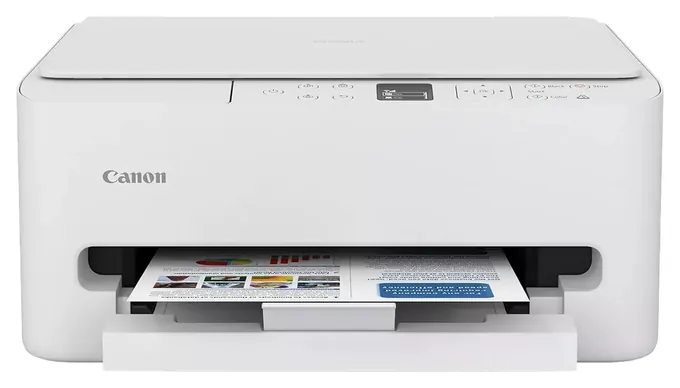
| 7. Canon PIXMA TS6520 | Cartridges | Copy, scan | 14 | None | Yes | 100 |
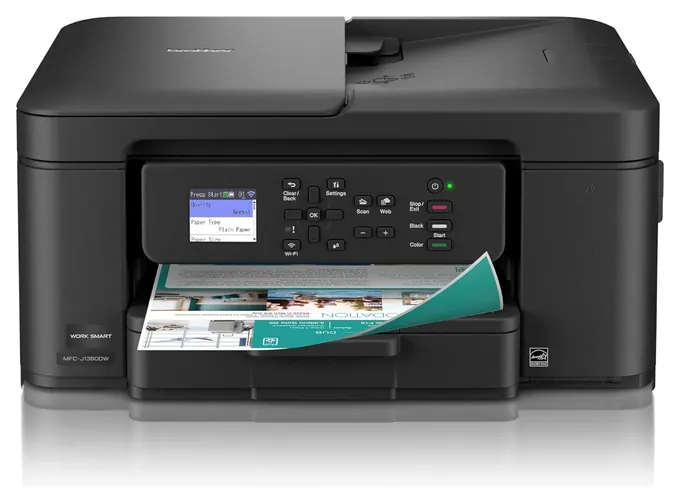
| 8. Brother MFC-J1360DW | Cartridges | Copy, scan | 16 | 20 | Yes | 150 |
Speeds are the makers' rated one-sided letter pages per minute (Canon rates in ISO images per minute). The two Brother lasers print black only; the rest print color. Only the HL-L2460DW, MFC-L2820DW and OfficeJet Pro 9125 have an Ethernet port.
Sources
- Epson EcoTank ET-2903 Specification sheet (PDF) User's Guide: paper for 2-sided printing
- Brother MFC-J4355DW and MFC-J1360DW Online User's Guide (PDF) MFC-J4355DW product page (ink bundle) MFC-J1360DW product page
- Brother HL-L2460DW Online User's Guide (PDF)
- HP OfficeJet Pro 9125e Specifications 9120e series User Guide (PDF)
- Canon PIXMA G3270 Product page (Canada)
- Brother MFC-L2820DW Online User's Guide (PDF)
- Canon PIXMA TS6520 Product page (Canada)
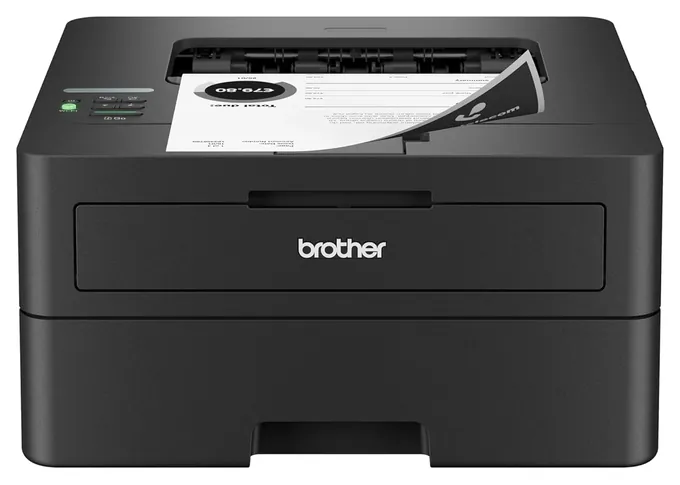
From the manual
- The toner in the box is a starter rated for about 700 pages; a standard TN830 is rated for about 1,200, the TN830XL about 3,000. p. 247
- Automatic two-sided printing takes letter or legal plain paper up to 28 lb and runs at about half the one-sided speed. p. 244
- It won't power itself off while connected to a network, and its Deep Sleep mode can't be disabled. pp. 217-218
- Brother may charge for repairs if non-genuine toner caused the damage, even under warranty. p. 195
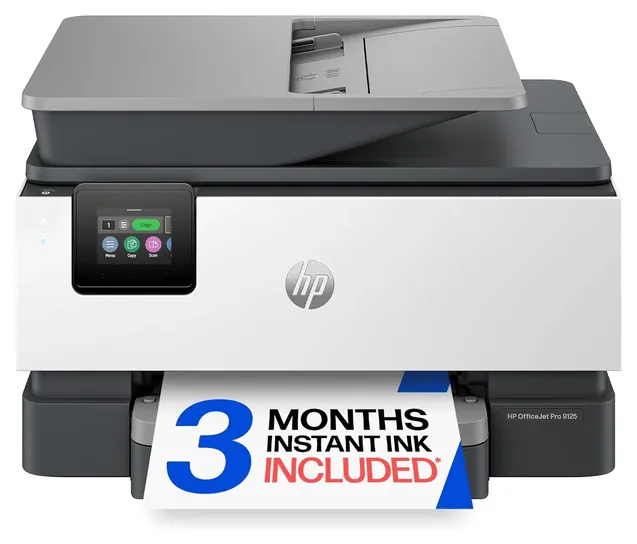
From the manual
- With HP+ turned on, it must stay connected to the internet, and with non-HP or refilled cartridges installed it won't print. pp. 7, 78
- It's built to accept only cartridges with a new or reused HP chip, and firmware updates can block cartridges that worked before. p. 78
- Finish setup over Wi-Fi or Ethernet: HP+ won't work as expected if the printer is set up with a USB cable. p. 9
- The feeder scans two-sided originals up to A4 length; legal-size originals go through one side at a time. p. 115
From the manual
- Once set up, keep it flat: on its side or upside down it can leak ink, and the tanks can't be drained for a move. Refilling Ink Tanks; Transporting
- The bottles in the box print fewer pages than later sets, because some of that ink fills the print head at setup. Ink Tips page
- Ink used for cleaning collects in a maintenance cartridge that must be replaced when it fills. Ink Tips page
- Canon asks for at least one print a month, and for switching off with the ON button before unplugging, so the head gets capped. Keeping Print Quality High
From the manual
- The 50-sheet feeder scans and copies one side at a time; automatic two-sided scanning is listed only for the MFC-L2900DW models. p. 648
- Scan-to-cloud covers Google Drive, Dropbox, OneDrive, Box and more, but each needs its own account and an internet connection. pp. 435, 437
- The toner in the box is a starter rated for about 700 pages; a standard TN830 is rated for about 1,200. p. 652
- It weighs about 25.5 pounds with supplies installed, so plan on a sturdy shelf. p. 645
From the manual
- Don't reinstall a used cartridge: the nozzles can clog, and the printer can no longer warn you when to replace it. Replacing a FINE Cartridge
- Black-and-white pages can still use color ink, and head cleaning draws on both cartridges. Replacing a FINE Cartridge
- The ECO settings menu can make two-sided copying the default and switch the printer on and off automatically. ECO settings
- Removing and reinstalling a cartridge uses ink, so Canon advises leaving it in until the printer reports it empty. Ink Tips
From the manual
- Replacement LC501 cartridges are rated for about 250 black and 200 color pages; the XL versions about 500 each. p. 582
- The first cartridges spend extra ink filling the ink tubes, so the starter set prints fewer pages than later ones. p. 582
- No fax and no Ethernet: it connects by an outside USB port or Wi-Fi. pp. 36, 577, 579
- The output tray holds about 50 sheets, so long jobs need emptying partway. p. 577
Editor's Notes
November 5, 2026, by Ezvid Wiki Editors:
We read the makers' manuals and spec sheets for all eight printers and added a spec table, a section on why the ET-2903 leads and notes from each manual. We corrected Consumer Reports' text cost for the Canon TR4720 and RTINGS' top pick (the ET-8500, not the ET-8550), and dropped an unsupported mention of HP lawsuits. The HP entry now cites its own manual on HP-chipped cartridges.
October 19, 2026, by Ezvid Wiki Editors:
Not one printer from the late-2020 version of this list survived: each had been replaced, discontinued or priced out of sense. The HP OfficeJet Pro 9015, Epson ET-2750 and Canon TR4520 all have newer versions, the Kyocera color laser is unavailable, and the HP Tango X is gone. So we started over. The clearest lesson from the research is that a cheap printer is often the expensive one: Consumer Reports figures some budget inkjets cost more in ink over two years than an ink tank costs outright. That's why the Epson EcoTank ET-2903 and the Canon PIXMA G3270 are here, alongside the Brother HL-L2460DW for anyone who mostly prints text. We also flag HP's 2026 firmware that rejects third-party cartridges, since it shapes what an HP owner pays later.
Earlier notes
December 16, 2020, by Lauren Nelson:
This round of updates was quite the shakeup for a number of reasons. In a few cases, it was simply a matter of newer models with more powerful features coming on the market. The HP OfficeJet Pro 8035, for instance, was replaced with the HP OfficeJet Pro 9015 thanks to a faster print speed, higher paper capacity, and more compact design.
In some cases, rankings shifted as a result of other options coming on the market that did a better job of achieving the same results. The HP Tango X, for example, is still a solid choice, but fell in the rankings relative to the Canon Pixma TR150, which provides a similarly compact design with the added benefit of optional battery power and onboard controls. The Canon Pixma G6020 was bumped off the list altogether in favor of the Epson EcoTank ET-2750 thanks to a sleek design, higher ink capacity, and more efficient operations.
There were some instances where models simply did not offer distinct enough benefits to warrant their inclusion anymore. The Canon Wireless TS8220 All-In-One was a model that achieved many of the same functions as other items on the list at a higher price point. We instead decided to highlight a couple of picks like the Kyocera ECOSYS P5021cdw, which is a relatively compact, high-performance option that may benefit people who frequently print in high volumes. That being said, if you’re printing more than 1,000 pages per month, it might be worth it to invest in an even more powerful printer intended for office use.
June 12, 2019, by Daniel Imperiale:
With a reliable yearly turnover from pretty much every brand on the market, there's at least one new exciting printer from all companies. When considering what makes a good unit for the home, it's important to consider the average home user, who might fire up their printer only a few times per week if they aren't running a business. Given that usage pattern, things like a printer's footprint become rather important, and the HP Tango that took our top spot boasts one of the lowest profiles out there, as well as a built-in protective covering to store it if you can't dedicate a spot for it to live. It's also somewhat surprising that a model that small can be an all-in-one, and can be as reliable as it is. It seems like Epson isn't too interested in upgrading their Eco-Tank lineup, which are still fine printers, but they're getting a bit outdated in terms of connectivity, especially when you look at their XP-7100, which made it into the number two slot. Further down the list you'll see a new Pixma model from Canon that takes the ink tank mantle from Epson and applies it to a very competitive photo printer, but that's a bit too pricey for its other specs to climb any higher than fifth. [2026 update: Epson has kept updating the line; the EcoTank ET-2903 at #1 is what Epson calls its seventh generation of cartridge-free printers.]
Special Honors
Epson EcoTank Photo ET-8550 If photos matter more than documents, Epson's wide-format, six-color EcoTank prints borderless photos up to 13 by 19 inches from refill bottles. RTINGS names its letter-size sibling, the ET-8500, its best home printer. It costs several times as much as an entry ink tank, so it only makes sense for people who print photos often. epson.com
Vistaprint For jobs a home printer can't handle, such as business cards, posters, photo books or designs on mugs and shirts, a print service like Vistaprint takes your files and prints them in quantity. For a big one-off job, it's often cheaper than burning through a set of cartridges. vistaprint.com
Ink Tank, Cartridge Or Laser
Ink tank printers, sold as EcoTank, MegaTank and Smart Tank, fill from bottles.
Start with how much you print, because running cost outweighs the sticker price within a year or two. Cartridge inkjets are cheap to buy and expensive to feed. Consumer Reports put one popular budget model at about 25 cents per text page and estimated its two-year cost of ownership at nearly three times its purchase price. Better cartridge models do much better: Consumer Reports measured about 4 cents per text page for the Brother MFC-J4355DW.
Ink tank printers, sold as EcoTank, MegaTank and Smart Tank, fill from bottles. They cost more up front but print for well under a cent a page; Digital Trends worked out about 0.3 cents per black page for the Canon G3270, and even HP's own comparison puts its tanks at 0.4 cents black and 1.7 cents color (HP, a maker figure). The catch is speed: entry tanks print around 10 to 11 pages a minute and skip extras like a document feeder.
Laser printers fuse toner powder instead of spraying ink. A black-and-white laser like the Brother HL-L2460DW prints text at about 4 to 5 cents a page and up to 36 pages a minute, and toner doesn't dry out between jobs. Mono lasers can't print color or photos at all. As a rule of thumb, if you print under 30 pages a month, a good cartridge inkjet is fine; past 100 pages a month, choose a tank or a laser.
Features That Matter: Duplex, Feeders And Wi-Fi
Automatic duplex printing puts pages on both sides without flipping them by hand, which halves paper use for long documents. Most current models have it, but entry ink tanks such as the Epson ET-2903 and Canon G3270 don't.
An automatic document feeder (ADF) pulls a stack of originals through the scanner, so you can copy or scan a 12-page lease without lifting the lid 12 times. Feeders range from 20 sheets on Brother's inkjets to 50 on the Brother MFC-L2820DW. If you scan school forms, receipts or medical paperwork often, an ADF is the feature you'll miss most on a flatbed-only model.
For connections, dual-band Wi-Fi (2.4 and 5 GHz) helps in crowded apartment buildings where the 2.4 GHz band is congested (the Epson ET-2903 has 2.4 GHz only), and an Ethernet port is the most dependable link if the printer sits near your router. Every printer on this list works with Apple AirPrint and Android's Mopria standard, so phones and laptops print without extra drivers. Paper capacity matters less at home, but a 250-sheet tray means refilling half as often as a 100-sheet one.
Ink Lock-In, Care And Safety
Printer makers earn their money on supplies, and some push hard. HP's Instant Ink subscription ties cartridges to your account, and HP's own guide for the OfficeJet Pro 9125 says it works only with HP-chipped cartridges and that firmware updates can block ones that worked before. In early 2026 HP shipped such an update to eleven printer models, which a cartridge remanufacturers' trade group has criticized publicly (Technology.org). Brother sells an optional toner plan called Refresh. Epson and Canon tank printers use refill bottles with no account required, though Epson's warranty excludes damage from supplies it doesn't distribute, and Brother may charge for repairs that non-genuine supplies cause.
Ink also goes to cleaning, not just printing. "It's typical for an inkjet to use as much ink on maintenance as it does on printing," Rich Sulin, who led Consumer Reports' printer testing program at the time, said in a 2018 CR report. Canon's manuals ask for at least one print a month and say to switch off with the power button, not at the wall, so the print head caps itself; if a printer has sat for a month, run a nozzle check before a big job. Keep ink bottles capped, upright and away from small children. Lasers need less care, but their fusers get hot, and Brother's guides say to bag a used toner cartridge so the powder can't spill and to wash toner off skin or clothes with cold water.
We found no recalls for any printer on this list in the CPSC SaferProducts database as of this update. Finally, don't try to copy money: many printers detect banknotes and refuse, and copying currency is a federal crime (U.S. Secret Service).
How we researched this
We compared 20 current and recent home printers and kept 8. For those 8 we read Epson's ET-2903 specification sheet, warranty and ET-2900 Series User's Guide pages; Brother's Online User's Guides covering the MFC-J4355DW and MFC-J1360DW, the HL-L2460DW and the MFC-L2820DW; HP's OfficeJet Pro 9120e series User Guide; and Canon's online manuals for the G3070 series (G3270) and TS6500 series (TS6520). Running costs come from Consumer Reports' lab figures, with Wirecutter, RTINGS and Digital Trends for other independent test results. A search of the CPSC's SaferProducts recall database on November 5, 2026 found no recall for any of the 8 models, and the 3D models are built from published dimensions.
Sources (31)
- Wirecutter: The best all-in-one printer
- Consumer Reports: Brother MFC-J4355DW
- Consumer Reports: Brother HL-L2460DW
- Consumer Reports: Canon PIXMA TS6520
- Consumer Reports: Brother MFC-J1360DW
- Consumer Reports: Canon PIXMA TR4720
- Home Office Research: HP OfficeJet Pro 9125e review
- Digital Trends: HP OfficeJet Pro 9125e review
- Digital Trends: Brother HL-L2460DW review
- Digital Trends: Epson EcoTank ET-2800 review
- Digital Trends: Canon MegaTank PIXMA G3270 review
- RTINGS: Best home printers
- RTINGS: Brother MFC-L2820DW review
- Brother: MFC-L2820DW
- HP: Smart Tank vs cartridge cost per page
- Technology.org: HP keeps blocking third-party ink
- Notebookcheck: Epson EcoTank ET-8550
- CPSC SaferProducts
- U.S. Secret Service: Counterfeit currency
- Epson: EcoTank ET-2903 specification sheet (PDF)
- Epson: Limited warranty, U.S. and Canada (PDF)
- Brother: Online User's Guide, MFC-J4355DW and MFC-J1360DW (PDF)
- Brother: Online User's Guide, HL-L2460DW (PDF)
- Brother: Online User's Guide, MFC-L2820DW (PDF)
- HP: OfficeJet Pro 9120e series User Guide (PDF)
- HP: OfficeJet Pro 9125e specifications
- Canon: G3070 series online manual (G3270)
- Canon: TS6500 series online manual (TS6520)
- Consumer Reports: Epson EcoTank ET-2903
- Consumer Reports: The high cost of wasted printer ink (2018)
- Epson: EcoTank Photo ET-8550
Frequently asked questions
Is an ink tank printer worth it?
Usually, if you print more than a few dozen pages a month. Ink tank printers cost more to buy, but independent estimates put their pages at roughly 0.3 to 1 cent each, compared with about 4 to 25 cents for cartridge inkjets in Consumer Reports' tests. The ink in the box often lasts two to three years.
Should I get a laser or an inkjet printer?
Get a laser if you mostly print text: it's fast, costs about 4 to 5 cents a page, and toner doesn't dry out. Get an inkjet or ink tank if you need color, photos or art projects. A black-and-white laser can't print color at all.
Do I need an ink subscription?
No. HP Instant Ink and Brother Refresh are optional. They can save money for steady printers, but they tie supplies to an account, and canceling HP's plan disables the subscription cartridges. Buying ink or toner as needed works with every printer here.
Can I use third-party ink?
With Epson and Canon ink tanks, generally yes, though Epson's warranty doesn't cover damage caused by ink it doesn't distribute. HP's OfficeJet Pro 9125 takes only cartridges with an HP chip, new or reused, and with HP+ turned on it needs Original HP ink. Brother printers show genuine-supply prompts but accept compatible cartridges and toner, though Brother may charge for repairs they cause.
What is the most reliable printer for home use?
Lasers are the lowest-maintenance choice because toner can't dry out or clog. Inkjets and ink tanks stay reliable when they're used regularly; Canon's manuals ask for at least one print a month. Long idle spells can dry out and clog a print head.
Will a home printer work with my phone?
Yes. Every printer on this list supports Apple AirPrint and Mopria for Android, and each maker has a free app for scanning, ink levels and setup.